TL;DR
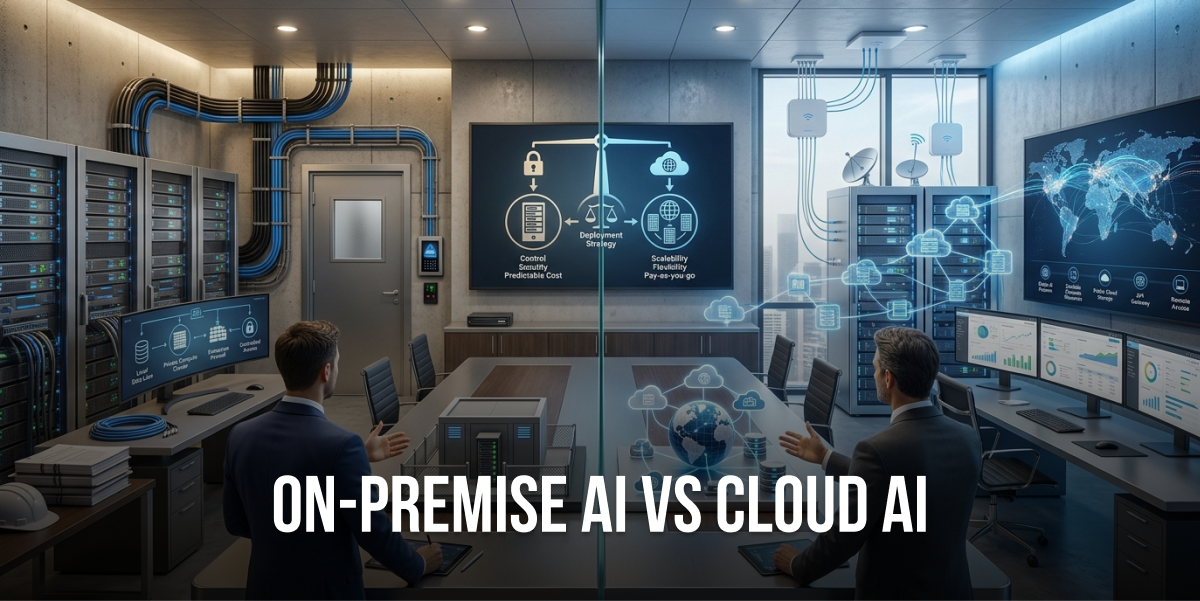
Cloud AI vs on-premise AI isn’t just a tech decision, it’s a strategic business choice that impacts costs, security, and scalability.
Decision-makers should care because choosing between cloud artificial intelligence benefits and on-premise AI advantages directly affects ROI, compliance, and competitive positioning.
This guide breaks down the real differences in cloud AI vs on-premises deployment, covering cost structures, security implications, and performance trade-offs.
You’ll learn practical frameworks for evaluating cloud based AI vs on-premises AI, including when to choose each approach and how to avoid costly mistakes.
We’ll also show how Tezeract helps businesses navigate this decision with production-ready AI solutions that actually deliver measurable results.
Understanding the Cloud AI vs On-Premise AI Landscape
Last year, I watched a healthcare company spend six months debating their AI infrastructure strategy. They kept circling back to the same question: cloud or on-premises? The indecision cost them market share while competitors launched AI-powered diagnostics tools.
Here’s what most guides won’t tell you: the cloud AI vs on-premise AI debate isn’t about which option is “better.” It’s about which one aligns with your specific business constraints, regulatory requirements, and growth trajectory.
Cloud artificial intelligence runs on remote servers managed by providers like AWS, Google Cloud, or Microsoft Azure. You access the computing power, storage, and AI tools through the internet. Think of it like renting a fully-equipped gym, you show up, use the equipment, and pay based on usage.
On-premise AI means you own and operate the entire infrastructure within your physical facilities. You buy the servers, install the software, hire the team to maintain everything. It’s like building your own private gym in your basement, complete control, but you’re responsible for every piece of equipment and maintenance.
Why This Decision Matters More Than Ever
The stakes have changed dramatically. According to a Gartner study (https://www.gartner.com/en/newsroom/press-releases/2023-11-29-gartner-says-cloud-will-become-a-business-necessity-by-2028), 85% of organizations will adopt a cloud-first principle by 2025. But here’s the twist, that same research shows 40% of enterprises are simultaneously investing in on-premises infrastructure for specific AI workloads.
What’s driving this apparent contradiction? Three factors:
First, data sovereignty regulations are getting stricter. Countries like Germany and France now require certain data types to stay within national borders. A financial services client of mine had to pull their fraud detection models back on-premises after new EU regulations kicked in.
Second, the cost equation isn’t as simple as it looks. Cloud AI seems cheaper upfront, no hardware purchases, no data center buildout. But when you’re processing terabytes of data daily, those usage fees add up fast. I’ve seen companies hit with $50,000 monthly cloud bills they didn’t anticipate.
Third, performance requirements for real-time AI applications are pushing some workloads back to the edge. When milliseconds matter, like in autonomous vehicles or high-frequency trading, the latency of cloud round-trips becomes a dealbreaker.
The Hidden Complexity Nobody Talks About
Most comparisons of on-premises AI vs cloud AI present a clean either-or choice. Reality is messier. You’ve got hybrid deployments, multi-cloud strategies, edge computing, and federated learning models that blur the lines completely.
A retail client recently told me they run customer recommendation engines in the cloud (for scalability during holiday peaks) but keep their inventory prediction models on-premises (because they’re integrated with legacy ERP systems that can’t easily move). That’s the real world of enterprise AI deployment.
The question isn’t really “cloud AI vs local AI“, it’s “which workloads belong where, and how do we make them work together seamlessly?”
What’s Changed in the Last Two Years
The landscape shifted significantly with the explosion of large language models. Training GPT-scale models requires compute resources that only cloud providers can realistically offer. But inference, actually using those models, can happen anywhere.
This created a new pattern: train in the cloud, deploy on-premises. Companies fine-tune foundation models using cloud GPUs, then deploy optimized versions to their own infrastructure for production use. It’s a hybrid approach that captures cloud artificial intelligence benefits for development while maintaining control for deployment.
Plus, the tooling has matured dramatically. Kubernetes, MLOps platforms, and containerization make it easier to move workloads between environments. You’re no longer locked into your initial choice the way you were five years ago.
Cloud Artificial Intelligence Benefits: The Real Advantages
Let me be straight with you, cloud AI isn’t perfect, but it solves some genuinely painful problems that on-premises setups struggle with.
Scalability That Actually Works
Remember that retail client I mentioned? During Black Friday, their AI-powered chatbot handled 50x normal traffic. In the cloud, they spun up additional compute instances in minutes. The cost? About $8,000 for the weekend spike.
If they’d built that capacity on-premises, they would’ve needed to purchase and maintain servers that sit idle 50 weeks per year. The capital expenditure alone would’ve been $200,000+, not counting the data center space, cooling, and power.
That’s the core cloud artificial intelligence benefits story: you pay for what you use, when you use it. Your AI infrastructure grows and shrinks with demand automatically.
A manufacturing company I worked with runs predictive maintenance models that spike during production hours but barely run overnight. Cloud deployment cut their infrastructure costs by 60% compared to maintaining always-on on-premises servers.
Speed to Market Is Unbeatable
Here’s something that surprised me: a healthcare startup went from idea to production AI model in six weeks using cloud infrastructure. They used pre-trained models from Azure AI, connected to cloud data warehouses, and deployed through managed services.
Doing the same thing on-premises would’ve required: purchasing servers (2-3 weeks lead time), setting up the data center environment (1-2 weeks), installing and configuring software (1-2 weeks), and hiring specialized staff (2-3 months). You’re looking at a 4-6 month timeline minimum.
When you’re racing competitors to market, those months matter. The cloud AI vs on-premises speed difference can determine who captures market share first.
Access to Cutting-Edge AI Services
Cloud providers invest billions in AI research and development. Google Cloud offers AutoML, AWS provides SageMaker, Azure has Cognitive Services, these are production-ready AI tools that would cost millions to build in-house.
A legal tech company I advised wanted to add document analysis to their platform. Building custom NLP models on-premises would’ve required a team of ML engineers and months of development. Instead, they integrated Azure’s Form Recognizer API in two weeks.
You get instant access to state-of-the-art models for vision, language, speech, and more. The innovation cycle of cloud providers means you’re always working with current technology, not infrastructure that’s outdated the moment you deploy it.
Reduced Operational Burden
Managing AI infrastructure is genuinely hard. You need expertise in hardware, networking, security, software updates, disaster recovery, and more. Most companies don’t have (and can’t afford) that specialized talent.
Cloud providers handle the operational heavy lifting. They manage security patches, hardware failures, network optimization, and compliance certifications. Your team focuses on building AI solutions, not babysitting servers.
Geographic Distribution Made Simple
If you need AI services available globally, cloud deployment is dramatically simpler. You can deploy models to multiple regions with a few clicks, ensuring low latency for users worldwide.
An e-commerce client serves customers across North America, Europe, and Asia. Their product recommendation engine runs in six different cloud regions, automatically routing requests to the nearest data center. Replicating that setup on-premises would require building data centers on three continents.
On-Premise AI Advantages: When Control Matters Most
Now, let’s talk about why smart companies still choose on-premises AI despite all those cloud benefits. Because there are legitimate, compelling reasons to keep AI infrastructure in-house.
Data Security and Sovereignty You Can Touch
A financial services company I consulted for processes millions of transactions daily. Their fraud detection AI analyzes incredibly sensitive financial data. The CISO told me bluntly: “I sleep better knowing that data never leaves our building.”
With on-premise AI advantages, you have physical control over your data. It doesn’t traverse the internet. It doesn’t sit on shared infrastructure. You control every aspect of access, encryption, and monitoring.
For industries dealing with HIPAA, PCI-DSS, or classified government data, this level of control isn’t optional, it’s mandatory. A healthcare provider explained their compliance officer won’t even consider cloud AI for patient diagnosis models because the regulatory risk is too high.
Data sovereignty regulations in countries like China, Russia, and increasingly in the EU require certain data to stay within national borders. On-premises deployment guarantees compliance without complex legal gymnastics.
For organizations with the most stringent security requirements, enterprise LLM infrastructure services can help design and deploy secure on-premises AI systems that maintain complete control over data and models while meeting compliance standards.
Predictable Costs for High-Volume Workloads
Here’s where the cost equation flips: if you’re running AI workloads 24/7 at high volume, on-premises can be significantly cheaper long-term.
A logistics company processes route optimization algorithms continuously. They crunched the numbers: cloud deployment would cost $180,000 annually in compute fees. Building their own infrastructure cost $250,000 upfront but only $40,000 yearly in power and maintenance.
Break-even happened in year two. By year five, they’d saved over $500,000 compared to cloud deployment. The on-premise AI total cost of ownership made financial sense for their consistent, predictable workload.
This is especially true for inference workloads. Training models in the cloud makes sense (you need that burst capacity), but running inference on millions of requests daily? On-premises often wins the cost battle.
Performance and Latency Control
When you need single-digit millisecond response times, network latency to cloud data centers becomes a problem. A manufacturing client runs computer vision models for quality control on production lines. Parts move past cameras at high speed, they need AI inference in under 10 milliseconds.
Cloud round-trip latency alone can be 20-50 milliseconds depending on location and network conditions. That’s before any actual processing happens. On-premises deployment with edge computing gives them the 5-8 millisecond response times they need.
For autonomous vehicles, high-frequency trading, industrial automation, or real-time gaming, this performance difference isn’t academic, it’s the difference between working and not working.
Integration with Legacy Systems
Most enterprises run on legacy systems that can’t easily move to the cloud. A pharmaceutical company has a 20-year-old manufacturing execution system that controls their production lines. It’s deeply integrated with dozens of other systems.
Their AI-powered quality prediction models need real-time access to that MES data. Moving everything to the cloud would require a multi-year, multi-million dollar migration project. Instead, they deployed AI on-premises where it can directly access existing databases and systems.
Sometimes the path of least resistance is keeping new AI infrastructure close to old systems, rather than trying to bridge the cloud-to-on-premises gap.
Customization and Control
Cloud platforms offer tremendous flexibility, but you’re still working within their frameworks and limitations. On-premises deployment gives you complete control over hardware selection, software configuration, and optimization.
A research institution runs specialized AI models for genomic analysis. They need specific GPU configurations and custom networking setups that cloud providers don’t offer. On-premises infrastructure lets them build exactly what they need.
You can optimize every layer of the stack, from hardware to OS to AI frameworks, for your specific use case. That level of customization can yield significant performance improvements for specialized workloads.
Side-by-Side Comparison of Cloud AI vs On-Premises AI
Let’s cut through the marketing fluff and look at the real differences between cloud based AI vs on-premises AI across the factors that actually matter for your business.
| Factor | Cloud AI | On-Premises AI |
|---|---|---|
| Initial Cost | Low ($0-$5K setup) Pay-as-you-go model | High ($100K-$500K+) Capital expenditure required |
| Ongoing Costs | Variable, can escalate $5K-$50K+ monthly typical | Predictable $3K-$10K monthly (power, maintenance) |
| Scalability | Instant, unlimited Scale up/down in minutes | Limited by hardware Weeks to months to expand |
| Time to Deploy | Days to weeks Immediate infrastructure access | Months Hardware procurement + setup |
| Data Security | Shared responsibility Provider manages infrastructure security | Complete control You manage all security layers |
| Compliance | Provider certifications help Data location can be complex | Full control Easier to prove compliance |
| Performance/Latency | Network-dependent 20-100ms typical latency | Optimized for local access 1-10ms latency possible |
| Maintenance Burden | Low Provider handles infrastructure | High Requires dedicated IT staff |
| Customization | Limited to provider options Standardized configurations | Complete flexibility Custom hardware/software stacks |
| Disaster Recovery | Built-in redundancy Automated backups | You must implement Additional cost and complexity |
| Best For | Variable workloads Rapid deployment Global distribution Startups/SMBs | Consistent high-volume workloads Strict compliance requirements Low-latency needs Enterprises with existing infrastructure |
The Real Cost Breakdown Nobody Shows You
Let’s talk actual numbers because the cloud AI vs on-premise AI comparison gets fuzzy when people use vague terms like “cost-effective.”
For a medium-sized AI workload (think 100 inference requests per second, 24/7 operation):
Cloud AI costs: You’re looking at roughly $15,000-$25,000 monthly for compute, storage, and data transfer. That’s $180,000-$300,000 annually. Over five years: $900,000-$1,500,000. Plus, costs typically increase 10-15% yearly as your usage grows.
On-premises costs: Initial hardware investment of $200,000-$300,000. Annual operating costs (power, cooling, maintenance, staff) around $60,000-$80,000. Over five years: $500,000-$600,000 total. Hardware refresh in year 4-5 adds another $150,000-$200,000.
The break-even point typically hits around 18-24 months for consistent workloads. But here’s the catch: if your workload is variable or seasonal, cloud AI wins because you’re not paying for idle capacity.
Security Isn’t Black and White
The data security on-premise AI advantage is real, but it’s not absolute. Cloud providers invest more in security than most companies can afford to implement on-premises. AWS, Azure, and Google Cloud have security teams of thousands and achieve certifications most enterprises can’t match.
The question isn’t “which is more secure” but “which security model fits your risk profile and compliance requirements.” A bank might need on-premises for core transaction processing but use cloud AI for customer service chatbots.
How to Decide Between Cloud and On-Premise AI
Okay, so you’ve got the facts. Now comes the hard part: actually making the decision for your specific situation. Here’s the framework I use when advising clients on comparing cloud AI solutions versus on-premises deployment.
Start with Your Data
First question: where does your data live, and can it move?
If your data is already in the cloud (SaaS applications, cloud data warehouses), cloud AI is the obvious choice. Moving that data on-premises for AI processing creates unnecessary complexity and cost.
If your data is on-premises and can’t move due to compliance, security, or technical constraints, you’ve got your answer. A healthcare provider with patient records in on-premises systems isn’t moving that to the cloud just for AI.
Data gravity is real. AI workloads perform best when they’re close to the data they process. Fighting that gravity is expensive and slow.
Evaluate Your Workload Patterns
Map out your AI workload characteristics:
Variable/Unpredictable: Cloud AI wins. If you can’t predict resource needs, paying for on-premises capacity that sits idle is wasteful. A marketing platform that spikes during campaign launches needs cloud elasticity.
Consistent/Predictable: On-premises becomes cost-effective. If you’re running the same workload 24/7/365, the economics favor owned infrastructure. That logistics company I mentioned earlier had perfectly predictable routing calculations, on-premises made sense.
Batch Processing: Cloud AI is ideal. If you run AI jobs periodically (monthly reports, quarterly analysis), you don’t want infrastructure sitting idle between runs. Spin up cloud resources when needed, shut them down when done.
Real-Time/Low-Latency: On-premises or edge deployment is often necessary. If milliseconds matter, network latency to cloud data centers becomes a bottleneck.
Calculate Your True Total Cost of Ownership
Don’t just compare sticker prices. Calculate the full on-premise AI total cost of ownership including hidden costs most people miss:
Cloud AI hidden costs: Data egress fees (moving data out of the cloud), inter-region transfer costs, premium support contracts, over-provisioning for peak capacity, vendor lock-in migration costs.
On-premises hidden costs: Data center space and cooling, redundant systems for high availability, disaster recovery infrastructure, specialized staff salaries, hardware refresh cycles, opportunity cost of capital tied up in equipment.
A financial services client thought on-premises would save money until they factored in the $150,000 annual salary for the infrastructure engineer they’d need to hire. That changed the equation significantly.
Assess Your Team’s Capabilities
Be brutally honest about your team’s expertise. On-premises AI requires specialized skills in hardware management, networking, security, and AI infrastructure. If you don’t have that talent and can’t afford to hire it, cloud AI’s managed services become very attractive.
A mid-sized retailer wanted on-premises AI for cost reasons but realized they’d need to hire three additional engineers. The salary cost alone exceeded the cloud AI fees they were trying to avoid.
Consider the Hybrid Middle Ground
Here’s what I tell most clients: you probably don’t need to choose one or the other exclusively. The smartest AI cloud vs on-premises strategy is often hybrid.
Train models in the cloud (you need that burst GPU capacity), deploy inference on-premises (for cost and latency). Store sensitive data on-premises, use cloud AI services for non-sensitive workloads. Run core AI on-premises, use cloud for disaster recovery and overflow capacity.
A manufacturing company runs their primary computer vision models on-premises at each factory (low latency, no internet dependency) but uses cloud AI for centralized model training and updates. Best of both worlds.
Organizations looking for expert guidance on navigating these complex infrastructure decisions can benefit from working with experienced partners who specialize in enterprise AI development services that cover everything from strategy to production deployment across cloud, on-premises, and hybrid environments.
Think About Your Three-Year Roadmap
Don’t optimize for today’s needs alone. Where will your AI initiatives be in three years?
If you’re just starting with AI and expect rapid experimentation, cloud AI’s flexibility is invaluable. You can try different approaches without massive upfront investment.
If you’re scaling proven AI workloads and expect consistent growth, on-premises economics improve over time. The initial investment amortizes across increasing usage.
A startup should almost always choose cloud AI, you need speed and flexibility more than cost optimization. An enterprise with mature AI operations might find on-premises makes financial sense for core workloads.
Not Sure Whether Cloud or On-Premise AI Is Right for You?
Compare your data, security, infrastructure, budget, and scalability needs before choosing a deployment model. Tezeract can help you assess the best fit for your AI project.
✅ You own 100% of your code.
✅ 100% confidential.
✅ NDA available before discussions.
Best Practices for Enterprise AI Deployment
Whether you choose cloud, on-premises, or hybrid, these best practices for enterprise AI deployment will save you from painful mistakes I’ve seen companies make.
Start Small and Prove Value
Don’t bet the farm on your first AI deployment. Start with a pilot project that delivers measurable business value in 3-6 months. Prove the ROI before scaling infrastructure investment.
A logistics company wanted to build a massive on-premises AI infrastructure for route optimization. I convinced them to start with a cloud-based pilot covering one region. Good thing, they discovered their data quality issues made the AI models unreliable. They fixed the data problems before investing in infrastructure.
Pilot projects also help you understand your actual resource needs. Theoretical calculations are always wrong. Real-world usage patterns reveal the truth.
Implement Robust Data Governance
Your AI data governance strategies need to be in place before you deploy anything. Define who owns data, who can access it, how it’s protected, and how long it’s retained.
This matters whether you’re in the cloud or on-premises. A healthcare provider got hit with HIPAA violations because they didn’t properly configure access controls on their cloud AI environment. The technology wasn’t the problem, the governance was.
Document data lineage (where data comes from, how it’s transformed, where it goes). Implement audit logging. Establish clear policies for handling sensitive information. These aren’t optional nice-to-haves, they’re requirements for responsible AI deployment.
Plan for Model Lifecycle Management
AI models aren’t deploy-and-forget. They need continuous monitoring, retraining, and updating. Build MLOps practices from day one.
A retail client deployed a demand forecasting model that worked great initially. Six months later, accuracy dropped 30%. Why? The model wasn’t being retrained with new data. Consumer behavior had shifted, but the model was stuck in the past.
Whether cloud or on-premises, you need systems for model versioning, A/B testing, performance monitoring, and automated retraining. This operational maturity matters more than your infrastructure choice.
Build in Flexibility and Portability
Avoid vendor lock-in whether you’re using cloud or on-premises solutions. Use containerization (Docker, Kubernetes) and standard AI frameworks (TensorFlow, PyTorch) that work across environments.
A financial services company built their entire AI stack on proprietary AWS services. When they needed to move some workloads on-premises for compliance, they faced a complete rewrite. Cost them six months and $500,000.
Design for portability from the start. You might start in the cloud and move to on-premises later (or vice versa). You might need to switch cloud providers. Make those transitions possible without starting from scratch.
Invest in Security from Day One
Security isn’t something you add later. Whether you’re asking “is cloud AI more secure than on-premise” or the reverse, the answer is: it depends on how you implement it.
Implement encryption at rest and in transit. Use strong authentication and authorization. Segment networks. Monitor for anomalies. Conduct regular security audits. These practices apply regardless of where your AI runs.
A manufacturing company thought their on-premises AI was secure because it was “behind the firewall.” Then an insider threat compromised their models. Physical location doesn’t equal security, proper controls do.
Measure and Optimize Continuously
Track your AI infrastructure costs, performance, and business impact religiously. What you don’t measure, you can’t improve.
Set up dashboards showing compute costs, model latency, accuracy metrics, and business KPIs. Review monthly. Look for optimization opportunities.
A SaaS company discovered they were spending $12,000 monthly on cloud AI resources that were barely used. They right-sized their infrastructure and cut costs 60% without impacting performance. But they only found this because they were actually looking at the metrics.
Common Pitfalls and How to Avoid Them
Let me share the mistakes I see companies make repeatedly in the cloud AI and on-premises AI decision process.
Pitfall 1: Choosing Based on Hype Instead of Needs
Cloud AI is trendy. Everyone’s talking about it. But trendy doesn’t mean right for your situation.
A manufacturing company moved their AI workloads to the cloud because “that’s what everyone’s doing.” Their latency requirements weren’t met, costs ballooned, and they ended up moving back on-premises six months later. Wasted time and money.
Make decisions based on your specific requirements, performance, cost, compliance, team capabilities, not industry buzz.
Pitfall 2: Underestimating Data Transfer Costs
Data egress fees from cloud providers can be shockingly expensive. If your AI models need to process large volumes of data that then moves back to on-premises systems, those transfer costs add up fast.
A media company learned this the hard way. Their video analysis AI processed terabytes daily in the cloud, then transferred results back to their on-premises content management system. Data egress fees were $15,000 monthly, more than the compute costs.
Calculate data transfer volumes and costs before committing to cloud AI. Sometimes keeping processing close to where data ultimately lives makes more sense.
Pitfall 3: Ignoring the Talent Gap
On-premises AI requires specialized expertise that’s expensive and hard to find. Don’t assume you can just “figure it out” or that your existing IT team can handle it.
A healthcare provider bought $300,000 in AI infrastructure but couldn’t find qualified engineers to manage it. The hardware sat idle for four months while they searched for talent. Cloud AI would’ve let them start immediately with managed services.
Honestly assess whether you have (or can acquire) the necessary skills before choosing on-premises deployment.
Pitfall 4: Not Planning for Scale
Your pilot AI project might run fine on modest infrastructure. But what happens when you scale to production volumes?
A retail company built an on-premises recommendation engine that worked great in testing. When they launched to all customers, it couldn’t handle the load. They had to emergency-migrate to cloud AI, which was expensive and chaotic.
Model your expected scale and growth. Build infrastructure that can handle 3-5x your initial projections. Better to have headroom than to scramble when success overwhelms your systems.
Pitfall 5: Forgetting About Disaster Recovery
What happens if your AI infrastructure fails? Cloud providers build in redundancy automatically. On-premises deployments require you to implement disaster recovery yourself.
A financial services company ran critical fraud detection on-premises. A power outage took down their data center for six hours. They had no failover. The cost of missed fraud detection during that window exceeded $200,000.
Whatever deployment model you choose, have a disaster recovery plan. Test it regularly. Know your recovery time objectives and ensure your infrastructure can meet them.
Need Help Choosing an AI Deployment Model?
Get expert guidance on cloud, on-premise, and hybrid AI based on your business requirements. We can help you plan the right infrastructure and development approach.
✅ You own 100% of your code.
✅ 100% confidential.
✅ NDA available before discussions.
The Future of AI Infrastructure Deployment
Let’s talk about where this is all heading, because the future of AI infrastructure deployment is evolving faster than most people realize.
Edge AI Is Changing the Game
The next frontier isn’t cloud versus on-premises, it’s edge AI. Running AI models directly on devices (smartphones, IoT sensors, autonomous vehicles) eliminates latency and reduces bandwidth costs.
Apple’s on-device AI processing in iPhones shows where this is going. Models run locally, data stays on the device, and performance is instant. This pattern will expand to industrial equipment, medical devices, and smart infrastructure.
According to Gartner research, over 50% of enterprise data will be created and processed outside traditional data centers by 2025. Edge AI is driving this shift.
Hybrid and Multi-Cloud Become Standard
The future isn’t choosing between cloud AI vs on-premises, it’s orchestrating workloads across both, plus multiple cloud providers.
Companies will train models on whichever cloud offers the best GPU pricing that week, deploy inference to on-premises infrastructure for latency-sensitive applications, and use edge computing for real-time processing. Kubernetes and containerization make this workload portability possible.
A logistics company I work with already does this: they train route optimization models on Google Cloud (best AI tools), run core inference on-premises (cost and performance), and deploy simplified models to edge devices in delivery trucks (offline capability).
AI-Specific Hardware Proliferates
Specialized AI chips (Google’s TPUs, AWS Inferentia, NVIDIA’s latest GPUs) are making both cloud and on-premises AI more efficient. These purpose-built processors deliver 10-100x better performance per watt than general-purpose CPUs.
As these chips become more accessible, the economics of on-premises AI improve. A company can deploy AI-specific hardware that rivals cloud efficiency while maintaining control and predictable costs.
Federated Learning Blurs the Lines
Federated learning lets you train AI models across distributed data sources without centralizing the data. Your model learns from data at multiple locations (cloud, on-premises, edge) without that data ever leaving its source.
This solves the privacy and compliance challenges that force companies toward on-premises deployment while capturing the collaborative benefits of cloud AI. A healthcare consortium I advised uses federated learning to train diagnostic models across multiple hospitals without sharing patient data.
Sustainability Becomes a Decision Factor
AI training and inference consume massive amounts of energy. Companies are starting to factor environmental impact into infrastructure decisions.
Cloud providers increasingly use renewable energy and optimize for efficiency at scale. But on-premises deployment in regions with clean energy grids can also be sustainable. According to a Nature study, training a single large AI model can emit as much carbon as five cars over their lifetimes.
Expect sustainability metrics to become part of the cloud AI vs on-premise AI comparison alongside cost and performance.
How Tezeract Builds AI-Powered Solutions
Here’s the thing about choosing between cloud and on-premises AI: the infrastructure decision matters, but it’s not the hardest part. The hardest part is building AI solutions that actually work in production and deliver measurable business value.
That’s where Tezeract comes in.
Production-First Approach That Actually Ships
Most AI agencies deliver prototypes and proofs-of-concept that never make it to production. Tezeract focuses exclusively on AI solutions that work in real-world production environments from day one.
We’ve deployed over 300 AI projects across 12+ industries, legal, fashion, retail, healthcare, finance, logistics, and more. Every single one went live and delivered measurable ROI. That’s not luck, it’s methodology.
Our production-first approach means we design for scalability, reliability, and maintainability from the start. Whether you need cloud AI, on-premises deployment, or a hybrid approach, we build systems that actually work when real users hit them with real data.
Problem-First Methodology (Not Technology-First)
We don’t start by asking “should you use cloud or on-premises AI?” We start by understanding your business problem. What are you trying to achieve? What constraints do you face? What does success look like?
Then we recommend the infrastructure approach that fits your specific situation. Sometimes that’s cloud AI for rapid deployment and scalability. Sometimes it’s on-premises for compliance and cost control. Often it’s a hybrid approach that captures the best of both.
A healthcare client came to us wanting to build cloud-based diagnostic AI. After understanding their HIPAA requirements and data sensitivity, we recommended a hybrid approach: on-premises inference with cloud-based model training. That solution met their compliance needs while leveraging cloud AI benefits for development.
For organizations with strict data sovereignty requirements, our enterprise LLM infrastructure services help design and deploy secure on-premises or private cloud environments that maintain complete control over sensitive data and AI models.
Transparent Pricing and Rapid Prototyping
Most AI projects fail because of unclear costs and unrealistic timelines. Tezeract provides transparent pricing ($50K-$100K typical range for production AI solutions) and rapid prototyping that validates feasibility before major investment.
We’ll build a working prototype in 2-4 weeks that proves the AI approach works with your data and meets your performance requirements. You see real results before committing to full deployment. No surprises, no scope creep, no endless consulting fees.
This approach works whether you’re deploying cloud AI, on-premises infrastructure, or hybrid solutions. You get clarity on costs, timelines, and expected outcomes upfront.
End-to-End Ownership and Strategic Partnership
We don’t just build AI models and hand them off. Tezeract provides end-to-end ownership from initial design through deployment to ongoing optimization. We’re a thinking partner, not just developers.
That means we help you navigate the cloud AI vs on-premise AI decision based on your specific needs. We design the architecture, build the models, deploy to your chosen infrastructure, and optimize performance over time.
A retail client needed product recommendation AI. We helped them choose a hybrid approach (cloud training, on-premises inference), built the system, deployed it across their e-commerce platform, and continue optimizing it quarterly. Their conversion rate increased 23% and the system has been running flawlessly for 18 months.
Our comprehensive enterprise AI solutions portfolio includes intelligent automation, predictive analytics, conversational AI, and computer vision, all designed to integrate seamlessly with your existing infrastructure whether cloud-based or on-premises.
Industry-Specific Expertise That Matters
Generic AI solutions rarely work well. Tezeract brings deep expertise in specific industries, so we understand your unique challenges, compliance requirements, and success metrics.
In legal tech, we know document analysis needs to handle complex formatting and maintain chain of custody. In healthcare, we understand HIPAA requirements and clinical workflow integration. In finance, we know fraud detection models need explainability and audit trails.
This industry knowledge informs our infrastructure recommendations. We know when on-premises deployment is necessary for compliance versus when cloud AI is acceptable. We understand the performance requirements and cost constraints specific to your industry.
For businesses looking to seamlessly integrate AI capabilities into existing systems, our AI integration services help weave AI and ML into your current ecosystem to automate workflows and gain real-time insights, whether your infrastructure is cloud-based, on-premises, or hybrid.
Ready to Build Production AI That Actually Works?
If you’re tired of AI pilots that never ship, prototypes that don’t scale, or consultants who talk more than they deliver, let’s talk.
Tezeract specializes in production-ready AI solutions that deliver measurable ROI, whether you need cloud AI, on-premises deployment, or a hybrid approach tailored to your specific requirements.
Schedule a free consultation to discuss your AI infrastructure needs. We’ll help you understand whether cloud, on-premises, or hybrid deployment makes sense for your situation, and show you how we can build a solution that actually works in production.
Conclusion: Making the Right Choice for Your Business
So here’s what it comes down to: the cloud AI vs on-premise AI decision isn’t about which technology is “better.” It’s about which approach aligns with your specific business needs, constraints, and goals.
Cloud AI offers unmatched scalability, rapid deployment, and access to cutting-edge services without operational burden. It’s ideal for variable workloads, rapid experimentation, and companies that need to move fast without massive upfront investment.
On-premises AI provides complete control over data, predictable costs for high-volume workloads, and the performance needed for latency-sensitive applications. It makes sense for consistent workloads, strict compliance requirements, and enterprises with existing infrastructure.
But honestly? Most companies will end up with some combination of both. Hybrid approaches that leverage cloud artificial intelligence benefits for development and burst capacity while maintaining on-premise AI advantages for core production workloads often deliver the best results.
The key is starting with your business requirements, not the technology. Understand your data constraints, workload patterns, compliance needs, team capabilities, and cost structure. Then choose the infrastructure that fits those requirements.
Don’t let decision paralysis stop you from moving forward with AI. Start small, prove value, and scale what works. Whether you choose cloud, on-premises, or hybrid deployment, the important thing is getting started and learning from real-world results.
The future of AI infrastructure is flexible, distributed, and increasingly intelligent about where workloads run. Companies that master this orchestration, moving workloads seamlessly between cloud, on-premises, and edge environments, will have a significant competitive advantage.
Now you’ve got the framework to make an informed decision. Take what you’ve learned, evaluate your specific situation, and choose the path that sets your AI initiatives up for success.
Ready to Turn Your AI Idea Into a Working Solution?
Schedule a free 30-minute strategy session to discuss your specific needs and get a transparent assessment of whether AI is right for your use case. We’ll help you understand the real costs, realistic timelines, and expected ROI before you commit to anything.
✅ You own 100% of your code.
✅ 100% confidential.
✅ NDA available before discussions.
FAQs
When should I choose on-prem AI over cloud AI?
Choose on-premises AI when you have consistent, high-volume workloads running 24/7, strict data sovereignty or compliance requirements (like HIPAA or PCI-DSS), need single-digit millisecond latency for real-time applications, or have sensitive data that cannot leave your physical infrastructure. On-premises typically becomes cost-effective after 18-24 months for predictable workloads and provides complete control over your data and security measures. Organizations with the most stringent security and compliance needs can benefit from working with experienced partners who specialize in enterprise LLM infrastructure services to design secure on-premises AI systems.
What are the risks of cloud AI deployment?
The main risks of cloud AI deployment include unpredictable and escalating costs (especially data egress fees), potential data sovereignty and compliance issues when data crosses borders, network latency that can impact real-time applications, vendor lock-in that makes migration difficult, and shared responsibility security models where you must properly configure access controls. Additionally, internet connectivity becomes a single point of failure for cloud-dependent AI systems. Working with experienced AI development partners can help you navigate these risks and implement proper safeguards.
How do I decide between cloud and on-premise AI for my business?
Start by evaluating where your data currently lives and whether it can move, analyze your workload patterns (variable versus consistent), calculate true total cost of ownership including hidden costs, assess your team’s technical capabilities for managing infrastructure, and consider your compliance and security requirements. Most businesses benefit from a hybrid approach that uses cloud AI for development and variable workloads while keeping sensitive or high-volume production workloads on-premises. Enterprise AI development services can provide strategic guidance to help you make the right infrastructure decision based on your specific business requirements.
Is cloud AI more secure than on-premise AI?
Neither is inherently more secure, it depends on implementation. Cloud providers invest billions in security and achieve certifications most companies cannot match, but you share responsibility for proper configuration. On-premises AI gives you complete physical control over data and security measures, but requires significant expertise to implement properly. The right choice depends on your specific compliance requirements, data sensitivity, and internal security capabilities rather than a blanket statement about which is ‘more secure.’ Organizations can work with AI integration specialists to ensure proper security implementation regardless of deployment model.
What is the future of AI infrastructure deployment?
The future of AI infrastructure deployment is hybrid and distributed, combining cloud, on-premises, and edge computing based on workload requirements. Edge AI will handle real-time processing on devices, federated learning will enable training across distributed data sources without centralizing information, and AI-specific hardware will improve efficiency for both cloud and on-premises deployments. Companies will orchestrate workloads across multiple environments rather than choosing a single deployment model. Agentic AI services are emerging to help businesses design and manage these complex, distributed AI systems.
How can I understand AI model deployment options for my enterprise?
Understanding AI model deployment options requires evaluating three key dimensions: where your data lives and processing happens (cloud, on-premises, edge), how models are trained versus deployed (centralized training with distributed inference is common), and what level of control and customization you need. Consider starting with a pilot project to test different deployment approaches with real data before committing to large-scale infrastructure investments. Working with experienced AI partners who offer enterprise AI solutions can help you navigate these options based on your specific business requirements and ensure successful production deployment.